01
One-click installations
Install supported mods quickly without manually moving files into game folders. This makes the process easier for first-time users and drastically reduces avoidable mistakes.
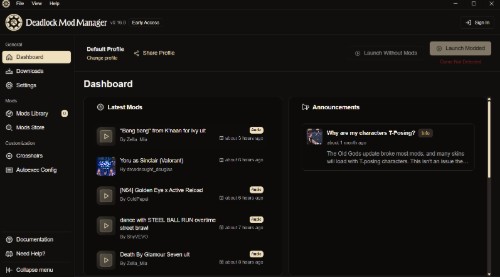
Deadlock Mod Manager is a sleek desktop tool built for players who want a faster, cleaner, and more reliable way to customize Deadlock. Browse community content, install supported mods in seconds, keep your setup organized, and switch between mod collections without the usual manual file work.
One-click
simple installs
Quick toggle
enable or disable
Clean library
organized mod lists
Modern UI
fast and lightweight
Deadlock Mod Manager UI Preview
Library
HUD Cleaner
Enabled
Crosshair Pack
Installed
Sound FX Plus
Update available
Selected Mod
Improve menu readability, sharpen HUD clarity, and add a more streamlined visual layer for players who prefer a cleaner competitive look.
Version
v2.4.1
Category
UI / HUD
Status
Ready
Why it matters
Manually modding a game can be messy. Files end up in the wrong folders, updates become hard to track, and removing a broken mod can take far longer than it should. Deadlock Mod Manager solves that by putting every important action into one dashboard. Instead of digging through game directories, you can install, toggle, sort, and remove supported mods with a cleaner workflow.
Built for players
Some players only want a few visual improvements. Others like maintaining a larger collection of UI changes, cosmetic tweaks, audio packs, and quality-of-life modifications. This site is designed to appeal to both groups. The manager keeps the experience approachable for newcomers while still giving experienced users the speed and organization they expect.
Designed for performance
A mod manager should not feel bloated. That is why this concept focuses on responsive interactions, fast navigation, and a polished interface with dark visuals that match the style of modern PC gaming tools. Everything from browsing to installation is intended to feel direct, smooth, and easy to understand.
Features
Deadlock Mod Manager is all about convenience, flexibility, and control. Instead of treating mods like loose files scattered around your system, the manager turns them into a structured library. That makes the entire process more predictable and much easier to maintain over time.
Install supported mods quickly without manually moving files into game folders. This makes the process easier for first-time users and drastically reduces avoidable mistakes.
Keep your installed mods in one organized dashboard. See what is active, what needs updating, and what can be removed, all from a single clean interface.
Not every session needs the same setup. Quickly toggle mods on or off without uninstalling them permanently, which is great for testing combinations or troubleshooting issues.
Managing updates becomes simpler when versions are visible and the manager keeps track of your installed content. A structured workflow makes long-term maintenance less frustrating.
Players who are new to modding often want a guided experience rather than a technical one. A good mod manager lowers the barrier and helps users feel confident from the start.
The visual identity here is made to feel premium and game-focused, with glowing panels, soft gradients, and clear information hierarchy that works well on both laptops and desktops.
About the manager
Deadlock is the kind of game that naturally inspires customization. Players enjoy changing visual elements, experimenting with interface upgrades, trying sound packs, and exploring ways to personalize the overall feel of the game. But the excitement of modding often fades when the setup process becomes repetitive or technical.
That is exactly where a dedicated manager becomes valuable. Instead of forcing players to handle every file manually, the manager creates a smoother layer between the game and the mods. It becomes easier to test different combinations, easier to revert changes, and easier to maintain a stable setup over time.
For a website like deadlockmodmanager.org, long-form content matters because people searching for a Deadlock mod manager are usually looking for trust, convenience, and clarity. They want to know what the tool does, why it is useful, how it compares to manual modding, and how quickly they can get started. This page is structured to answer all of those points in a clean way while also giving the site strong SEO depth.
Cleaner layouts, sharper indicators, improved readability, and competitive-style interface packs.
Visual changes for characters, icons, effects, and other presentation-focused improvements.
Alternative sounds, alert changes, ambient effects, and custom packs that alter game atmosphere.
Small but practical tweaks that improve comfort, convenience, and menu flow.
Install guide
A good landing page should not only explain what a tool is, but also show visitors how easy it is to start using it. The guide below is intentionally simple and easy to scan, making it useful for both readers and search engines.
Start by downloading the latest available version of Deadlock Mod Manager with us.
Once the file is downloaded, complete the installation and open the manager. The interface should feel simple immediately, with clear navigation for browsing mods, checking status, and managing your current setup.
The manager can help identify where the game is installed so supported mods can be placed correctly. Automatic path detection makes the process feel far more accessible to players who do not want to browse system directories manually.
Choose from available categories, open a mod page, review its details, and install it with a single action. Instead of juggling archives, everything is handled through a cleaner workflow built around ease of use.
After installation, you can keep adjusting your library. Turn mods off temporarily, remove the ones you no longer use, and keep your collection organized so the experience stays smooth over time.
Quick notes
FAQ
It is a tool designed to make Deadlock modding simpler by helping users install, organize, enable, disable, and maintain supported mods through a cleaner interface.
A manager reduces the chance of placing files incorrectly, makes your library easier to understand, and gives you faster control over which mods are active.
Yes. That is one of the biggest benefits of using a manager-style workflow. You can keep a mod installed but temporarily turn it off when needed.
It is ideal for players searching for an easier Deadlock modding experience, whether they are complete beginners or more experienced users who want a cleaner workflow.
Download Deadlock Mod Manager
Deadlock Mod Manager gives players a smoother, more modern way to work with mods. With one-click installs, organized library management, quick toggles, and a premium dark interface, it turns what could be a frustrating manual task into a much better experience.
deadlockmodmanager.org • Mod management made cleaner, faster, and easier